ECO mode TESLA MODEL X 2019 User Guide
[x] Cancel search | Manufacturer: TESLA, Model Year: 2019, Model line: MODEL X, Model: TESLA MODEL X 2019Pages: 224, PDF Size: 5.17 MB
Page 74 of 224

Note: If regenerative braking is aggressively
slowing Model X (such as when your foot is
completely off the accelerator pedal at
highway speeds), the brake lights turn on to
alert others that you are slowing down.Warning: In snowy or icy conditions
Model X may experience traction loss
during regenerative braking, particularly
when in the Standard setting and/or not
using winter tires. Tesla recommends
using the Low setting (see To Set the
Regenerative Braking Level on page 73)
in snowy or icy conditions to help
maintain vehicle stability.
The Energy app displays real-time feedback
on the amount of energy being gained by
regenerative braking. You can also display the
power meter on either side of the instrument
panel by choosing Energy using the scroll
button on the steering wheel (see Steering
Wheel on page 53).
The amount of energy fed back to the Battery using regenerative braking can depend on thecurrent state of the Battery and the charge
level setting that you are using. For example,
regenerative braking may be limited if the Battery is already fully charged or if the
ambient temperature is too cold.
Note: If regenerative braking is limited, a
dashed yellow line displays on the power
meter.
To Set the Regenerative Braking Level
You can use the touchscreen to change the
level of regenerative braking:
1. Touch Controls > Driving > Regenerative
Braking .
2. Choose from two levels:
Page 89 of 224

Towing Capacity
The total trailer weight (including all cargo and additional equipment), and the trailer tongue
weight, must never exceed the following:TiresMaximum Towing Capacity*Maximum Tongue Weight**19"***, 20" or 22"2250 kg90 kg
*Tesla recommends a separate braking system on trailers with a loaded weight of over 450 kg. Thebraking system must be appropriate for the weight of the trailer. Follow the instructions providedby the trailer brake manufacturer to ensure that trailer brakes are properly installed, adjusted, and
maintained.
**The tongue weight is the downward force that the weight of the trailer exerts on the hitch. It must not be less than 4% of the trailer load. Carrying a significant amount of equipment,
passengers, or cargo in the tow vehicle can reduce the tongue weight it can handle, which also
reduces the maximum towing capacity. Maximum towing capacity is calculated assuming the
GVWR (Gross Vehicle Weight Rating) is not exceeded. The GVWR is printed on the Statutory
Plate (see Statutory Plate on page 189).
***A Model X with 19" winter tires supports towing ONLY if equipped with these specific tires:
TireStuddedRim Size
Rating
(Front/Rear)Nokian Hakkapeliitta 8Yes19"110 T
(190 km/h)Nokian Hakkapeliitta R2No19"110 R
(170 km/h)Pirelli Sottozero 3No19"110 V
(240 km/h)Warning: Do not use Model X for towing if equipped with 19" winter tires that are not listed
above.
Towing and Accessories
88Model X Owner
Page 123 of 224

Speed Assist
How Speed Assist Works
When the Speed Limit Warning is turned on,
the instrument panel displays a speed limit as
determined by GPS data. Warnings (described
later) take effect when you exceed this limit.
In situations where Speed Assist is unable to
determine a speed limit (for example, speed
limit signs and GPS data are not available at
the current location), or if Speed Assist is
uncertain that an acquired speed limit is
accurate (for example, although a speed limit sign was initially detected, some time has
passed before a subsequent sign has been
detected), the instrument panel may not
display a speed limit sign and warnings do not take effect.
If you set the speed limit warning to Display
(see Controlling Speed Assist on page 122)
and exceed the determined speed limit, the
speed limit sign on the instrument panel
increases in size.
If you set the speed limit warning to Chime
(see Controlling Speed Assist on page 122)
and exceed the determined speed limit, the speed limit sign on the instrument panelincreases in size and Model X also sounds a
warning chime.
Note: Speed limit warnings go away after ten
seconds, or when Model X slows down below
the specified limit.
Warning:
Do not rely on Speed Assist to
determine the appropriate speed limit or driving speed. Always drive at a safespeed based on traffic and road
conditions.
Controlling Speed Assist
To adjust the Speed Limit Warning setting,
touch Controls > Autopilot > Speed Limit
Warning , then choose one of these options:
Page 155 of 224

prior to the event that triggered the Alert
state, provided that a properly configured USB
drive is inserted into one of the USB ports (see Dashcam on page 85).
In the Alarm state, the security alarm
activates, the audio system generates a loud
and unexpected sound, and the message on
the touchscreen increases to maximum brightness. Sentry Mode returns from Alarm to
Standby after 30 seconds.
Location-Based Settings
You can customize Sentry Mode to
automatically enable near certain locations
when the vehicle is parked. The available
settings are:
Page 158 of 224

Connecting to Wi-Fi
Wi-Fi is available as a data connection method and is often faster than cellular data networks.
Connecting to Wi-Fi is especially useful in areas with limited or no cellular connectivity.
To ensure fast, reliable delivery of software
and map updates, Tesla recommends leaving your vehicle connected to a Wi-Fi network
whenever possible (for example, if parked in
your garage overnight).
To connect to a Wi-Fi network:
1. Touch the cellular icon (usually LTE or 3G)
on the top corner of your touchscreen.
Model X will start scanning and display the
detected Wi-Fi networks that are within
range.
2. Select the Wi-Fi network you want to use,
enter the password (if necessary), then
touch Confirm .
3. Your vehicle connects to the Wi-Fi
network and will automatically connect to it whenever the network is within range.
You can also connect to a hidden network that
isn
Page 159 of 224

Software Updates
Loading New Software
Model X updates its software wirelessly,
providing new features throughout your term of ownership. Tesla recommends that you
install software updates as soon as they are
available. The first time you enter Model X
after an update is made available, a scheduling window displays on the touchscreen. The
scheduling window displays again at the end
of your first driving session.
Note: Some software updates can take up to
three hours to complete. Model X must be in
Park while the new software is being installed.
To ensure the fastest and most reliable
delivery of software updates, leave the Wi-Fi
turned on and connected whenever possible
(see Connecting to Wi-Fi on page 157).
Note: Software updates using cellular data are
also available if your vehicle is equipped with
premium connectivity.
Warning: Do not attempt to use the
vehicle while the software is being
updated. Vehicle functions, including
some safety systems, may be limited or disabled while a software update is inprogress and you could damage the
vehicle.
When a software update is available, a yellow
clock icon appears on the touchscreen
Page 162 of 224

Charging Equipment
Charging equipment designed specifically to
charge your Model X is available from Tesla. A
Tesla Wall Connector, which installs in your
garage, is the fastest way to charge Model X
at home.
In most market regions, Model X is equipped with a Mobile Connector and the adapter(s)
needed to plug into the most commonly used power outlets. When using the MobileConnector, first plug the Mobile Connector
into the power outlet, and then plug in Model X. For more information about your
Mobile Connector, see the Mobile Connector
Owner
Page 165 of 224
Charging Instructions
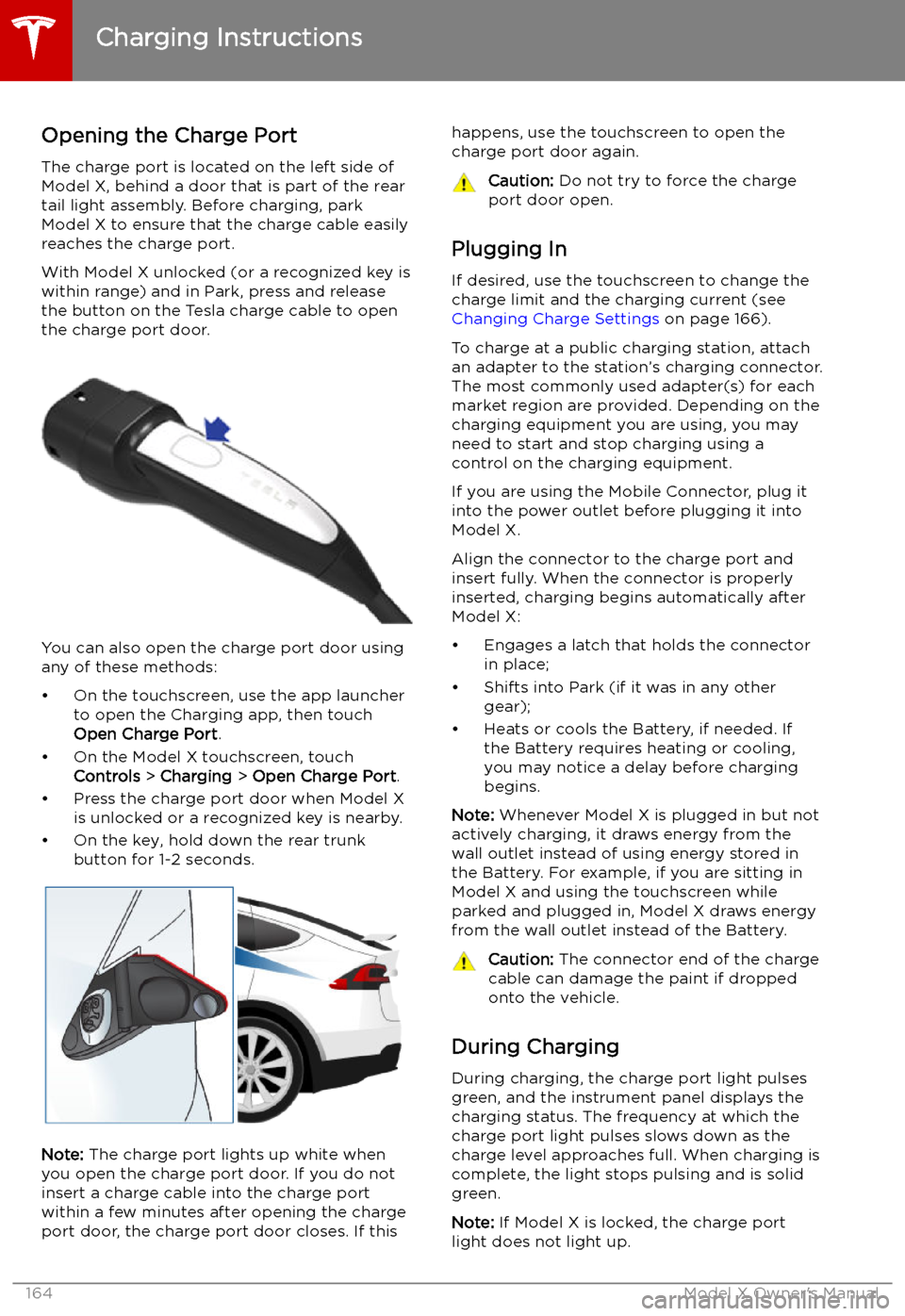
Opening the Charge Port The charge port is located on the left side of
Model X, behind a door that is part of the rear
tail light assembly. Before charging, park
Model X to ensure that the charge cable easily reaches the charge port.
With Model X unlocked (or a recognized key is
within range) and in Park, press and release
the button on the Tesla charge cable to open the charge port door.
You can also open the charge port door using
any of these methods:
Page 166 of 224
If the charge port light turns red while
charging, a fault is detected. Check the instrument panel or touchscreen for a
message describing the fault. A fault can
occur due to something as common as a power outage. If a power outage occurs,
charging resumes automatically when power
is restored.
Note: When charging, particularly at high
currents, the refrigerant compressor and fan
operate as needed to keep the Battery cool.
Therefore, it is normal to hear sounds during charging.
Note: Air conditioning performance is
generally not affected by charging. However,
under certain circumstances (for example, you
are charging at high currents during a
particularly warm day), the air coming from
the vents may not be as cool as expected and
a message displays on the instrument panel.
This is normal behavior and ensures that the Battery stays within an optimum temperature
range while charging to support longevity and
optimum performance.Warning: Never spray liquid at a high
velocity (for example, if using a pressure
washer) towards the charge port while
charging. Failure to follow these
instructions can result in serious injury or
damage to the vehicle, charging
equipment, or property.
Stopping Charging
Stop charging at any time by disconnecting
the charge cable or touching Stop Charging
on the touchscreen.
Note: To prevent unauthorized unplugging of
the charge cable, the charge cable latch remains locked and Model X must be unlockedor able to recognize your key before you can
disconnect the charge cable.
To disconnect the charge cable:
1. Press and hold the button on the
connector handle to release the latch.
Alternatively, unlock the vehicle by
opening a door, using a key fob, or
touching Stop Charging on the
touchscreen. These methods unlock the
charge port as well.
2. Pull the connector from the charge port.
3. Push the charge port door closed.
Note: If Model X is equipped with a motorized
charge port door, it automatically closes shortly after you remove the charge cable.
Caution: Tesla strongly recommends
leaving Model X plugged in when not in use. This maintains the Battery at the
optimum level of charge.
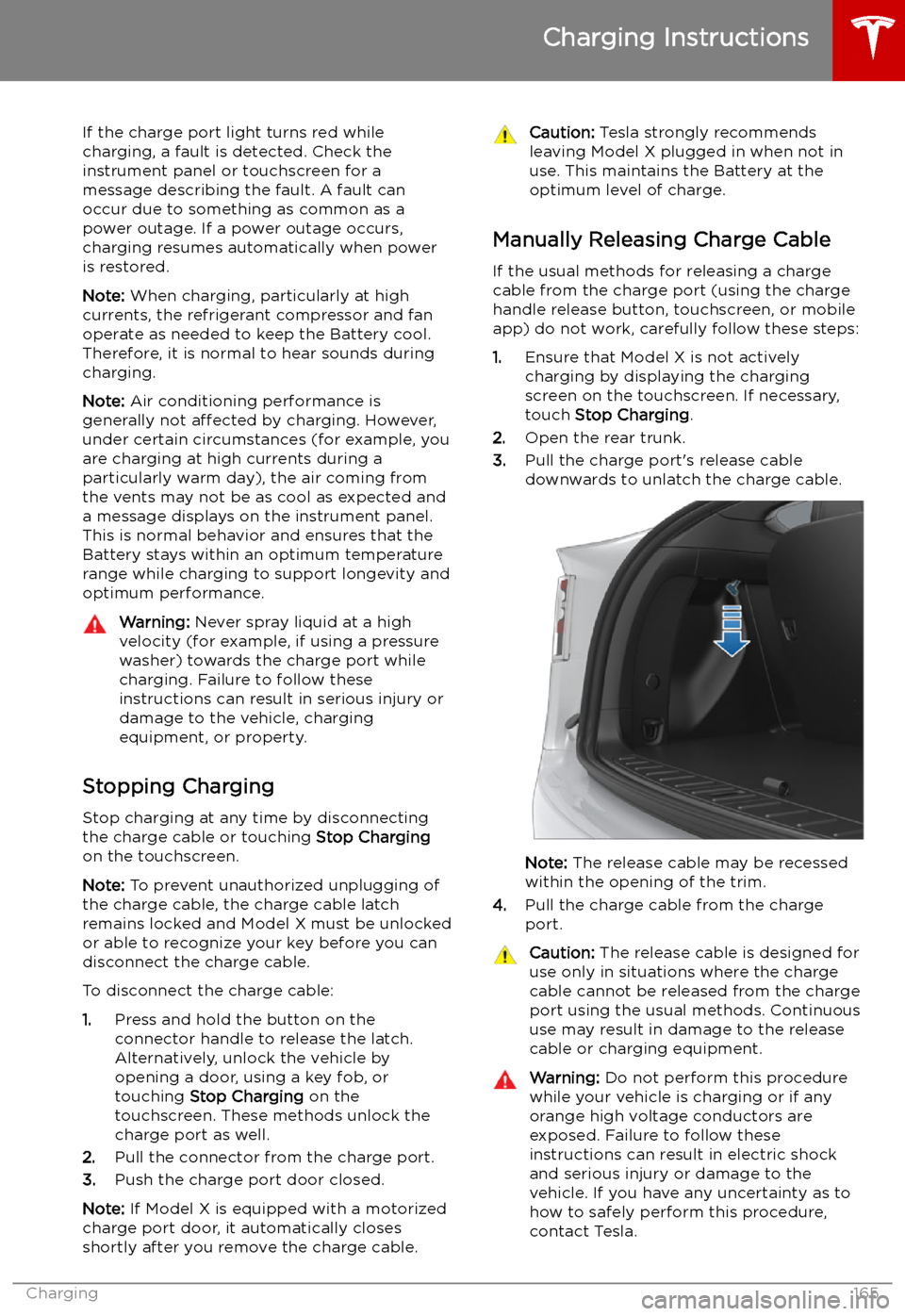
Manually Releasing Charge Cable
If the usual methods for releasing a charge
cable from the charge port (using the charge
handle release button, touchscreen, or mobile
app) do not work, carefully follow these steps:
1. Ensure that Model X is not actively
charging by displaying the charging
screen on the touchscreen. If necessary,
touch Stop Charging .
2. Open the rear trunk.
3. Pull the charge port
Page 171 of 224

Maintenance
Maintenance Schedule
Service Intervals
Your vehicle should generally be serviced on an as-needed basis. However, Tesla
recommends the following maintenance items
and intervals, as applicable to your vehicle, to ensure continued reliability and efficiency of
your Model X.